Gnomon › Templates › ArchiMate diagramsArchiMate diagrams Business, application and technology layers: for enterprise architecture.
ArchiMate is the notation to reach for when the audience is enterprise architecture rather than a delivery team: it models business capability and motivation alongside applications and technology, which C4 deliberately does not.
When to use these Showing how an application estate supports business capability. Motivation views: drivers, goals and the assessments behind a decision. Migration planning, where current and target states need to sit side by side. When not to Team-level software design. ArchiMate is heavier than C4 and the extra formality buys nothing there. Common mistakes ArchiMate's element set is large enough that two authors will model the same thing differently. Agree a subset before you start. Most useful views need perhaps a dozen element types, not the full specification.
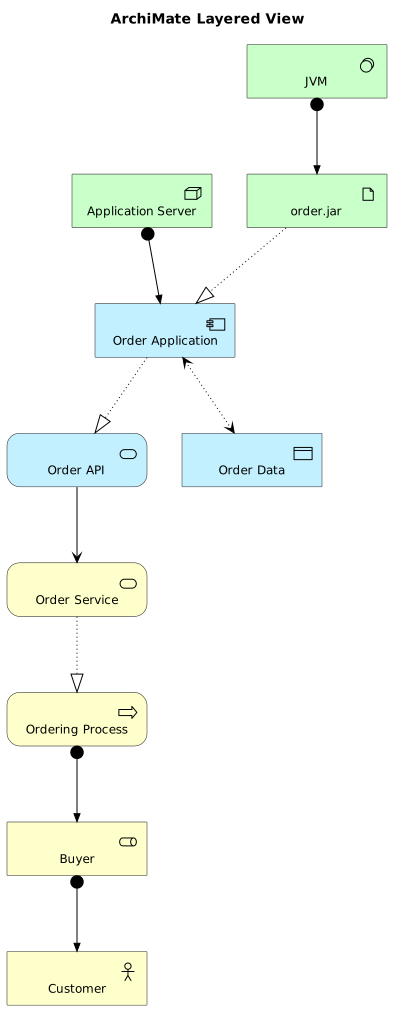
The 6 templates The classic view: business over application over technology.
Show the source @startuml
!include <archimate/Archimate>
title ArchiMate Layered View
' Business Layer
Business_Actor(customer, "Customer")
Business_Role(buyer, "Buyer")
Business_Process(ordering, "Ordering Process")
Business_Service(orderService, "Order Service")
' Application Layer
Application_Component(orderApp, "Order Application")
Application_Service(orderAPI, "Order API")
Application_DataObject(orderData, "Order Data")
' Technology Layer
Technology_Node(server, "Application Server")
Technology_Artifact(orderJar, "order.jar")
Technology_SystemSoftware(jvm, "JVM")
' Relationships
Rel_Assignment(buyer, customer)
Rel_Assignment(ordering, buyer)The rest of this template, and how to use it
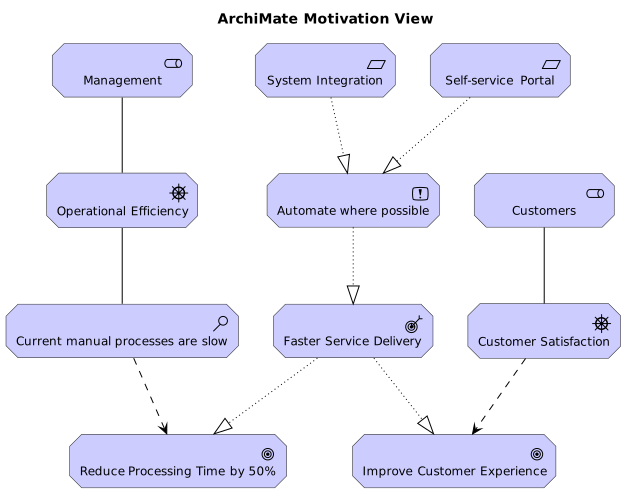
Why, not what. Drivers, goals, principles, requirements.
Show the source @startuml
!include <archimate/Archimate>
title ArchiMate Motivation View
Motivation_Stakeholder(management, "Management")
Motivation_Stakeholder(customers, "Customers")
Motivation_Driver(efficiency, "Operational Efficiency")
Motivation_Driver(satisfaction, "Customer Satisfaction")
Motivation_Assessment(currentState, "Current manual processes are slow")
Motivation_Goal(reduceTime, "Reduce Processing Time by 50%")
Motivation_Goal(improveExp, "Improve Customer Experience")
Motivation_Outcome(fasterService, "Faster Service Delivery")
Motivation_Principle(automation, "Automate where possible")
Motivation_Requirement(selfService, "Self-service Portal")
Motivation_Requirement(integration, "System Integration")
Rel_Association(management, efficiency)The rest of this template, and how to use it
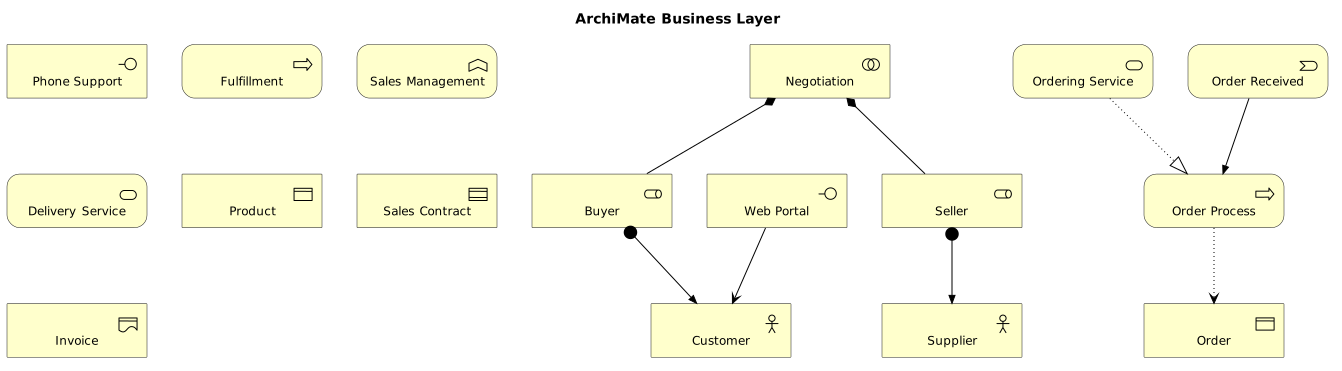
Processes, actors, services at the business layer.
Show the source @startuml
!include <archimate/Archimate>
title ArchiMate Business Layer
Business_Actor(customer, "Customer")
Business_Actor(supplier, "Supplier")
Business_Role(buyer, "Buyer")
Business_Role(seller, "Seller")
Business_Collaboration(negotiation, "Negotiation")
Business_Interface(webPortal, "Web Portal")
Business_Interface(phoneSupport, "Phone Support")
Business_Process(orderProcess, "Order Process")
Business_Process(fulfillment, "Fulfillment")
Business_Function(salesMgmt, "Sales Management")
Business_Service(ordering, "Ordering Service")
Business_Service(delivery, "Delivery Service")
Business_Event(orderReceived, "Order Received")The rest of this template, and how to use it
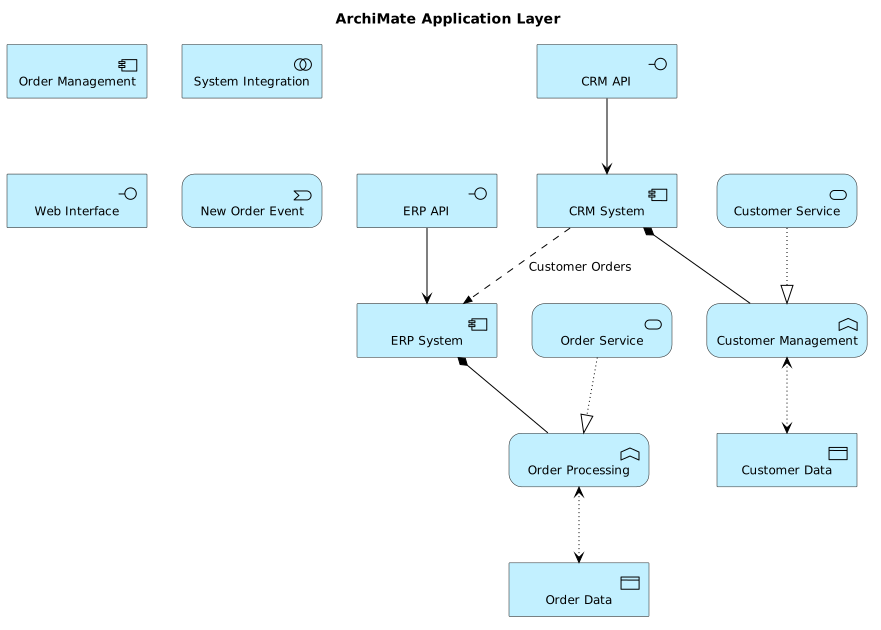
Components and the services they expose.
Show the source @startuml
!include <archimate/Archimate>
title ArchiMate Application Layer
Application_Component(crm, "CRM System")
Application_Component(erp, "ERP System")
Application_Component(orderMgmt, "Order Management")
Application_Collaboration(integration, "System Integration")
Application_Interface(crmAPI, "CRM API")
Application_Interface(erpAPI, "ERP API")
Application_Interface(webUI, "Web Interface")
Application_Function(customerMgmt, "Customer Management")
Application_Function(orderProcessing, "Order Processing")
Application_Service(customerService, "Customer Service")
Application_Service(orderService, "Order Service")
Application_DataObject(customerData, "Customer Data")
Application_DataObject(orderData, "Order Data")
The rest of this template, and how to use it
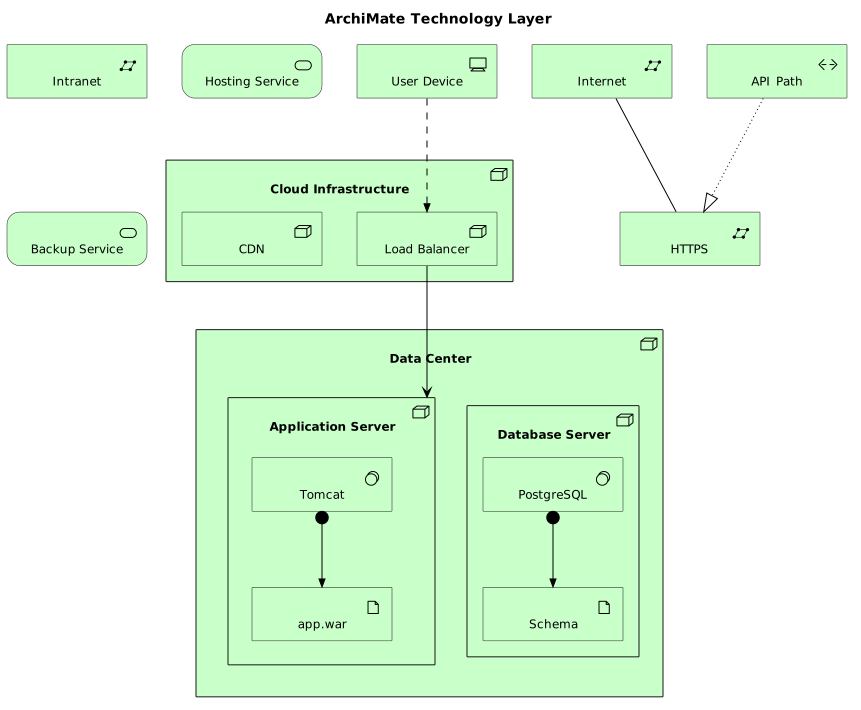
Nodes, devices, system software.
Show the source @startuml
!include <archimate/Archimate>
title ArchiMate Technology Layer
Technology_Node(datacenter, "Data Center") {
Technology_Node(appServer, "Application Server") {
Technology_SystemSoftware(tomcat, "Tomcat")
Technology_Artifact(warFile, "app.war")
}
Technology_Node(dbServer, "Database Server") {
Technology_SystemSoftware(postgres, "PostgreSQL")
Technology_Artifact(dbSchema, "Schema")
}
}
Technology_Node(cloud, "Cloud Infrastructure") {
Technology_Node(cdn, "CDN")
Technology_Node(loadBalancer, "Load Balancer")
}
Technology_Device(userDevice, "User Device")
Technology_CommunicationNetwork(internet, "Internet")
Technology_CommunicationNetwork(intranet, "Intranet")The rest of this template, and how to use it
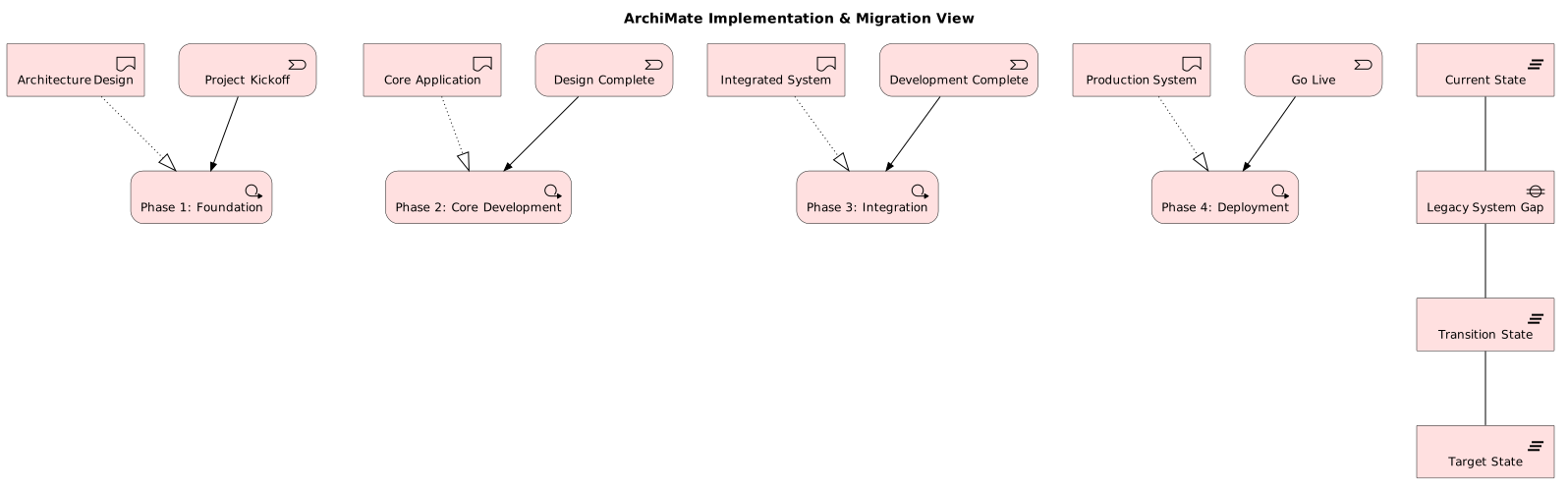
Work packages, deliverables, plateaus: for migration.
Show the source @startuml
!include <archimate/Archimate>
title ArchiMate Implementation & Migration View
Implementation_WorkPackage(wp1, "Phase 1: Foundation")
Implementation_WorkPackage(wp2, "Phase 2: Core Development")
Implementation_WorkPackage(wp3, "Phase 3: Integration")
Implementation_WorkPackage(wp4, "Phase 4: Deployment")
Implementation_Deliverable(d1, "Architecture Design")
Implementation_Deliverable(d2, "Core Application")
Implementation_Deliverable(d3, "Integrated System")
Implementation_Deliverable(d4, "Production System")
Implementation_Event(kickoff, "Project Kickoff")
Implementation_Event(milestone1, "Design Complete")
Implementation_Event(milestone2, "Development Complete")
Implementation_Event(goLive, "Go Live")
Implementation_Plateau(current, "Current State")
Implementation_Plateau(transition, "Transition State")
Implementation_Plateau(target, "Target State")
The rest of this template, and how to use it
Render these offline Every template here ships in Gnomon and renders on your machine, with no account and nothing sent to a server. The browser editor is free and needs no install.
Get Gnomon Open the browser editor