Layered View
The classic view: business over application over technology.
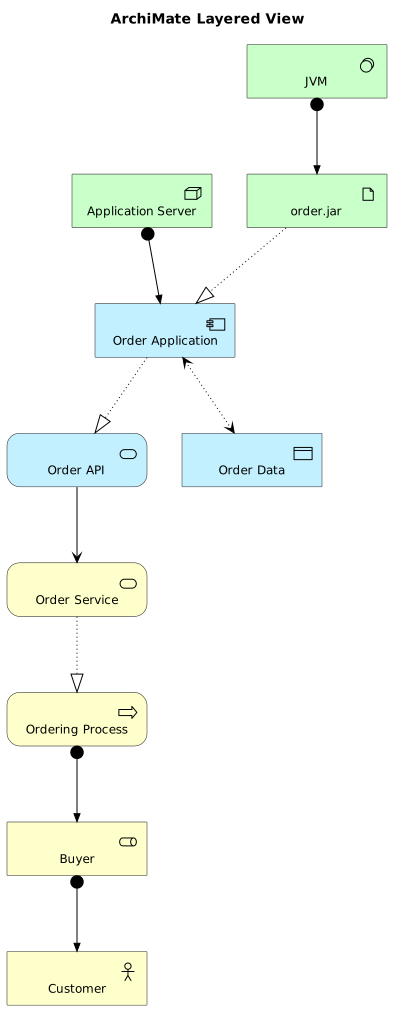
- Format.puml
- Length33 lines
- LibraryArchiMate
The source
33 lines of PlantUML, and pulls in ArchiMate. Copy it, or open the template inside Gnomon and render it as it is.
@startuml
!include <archimate/Archimate>

title ArchiMate Layered View

' Business Layer
Business_Actor(customer, "Customer")
Business_Role(buyer, "Buyer")
Business_Process(ordering, "Ordering Process")
Business_Service(orderService, "Order Service")

' Application Layer
Application_Component(orderApp, "Order Application")
Application_Service(orderAPI, "Order API")
Application_DataObject(orderData, "Order Data")

' Technology Layer
Technology_Node(server, "Application Server")
Technology_Artifact(orderJar, "order.jar")
Technology_SystemSoftware(jvm, "JVM")

' Relationships
Rel_Assignment(buyer, customer)
Rel_Assignment(ordering, buyer)
Rel_Realization(orderService, ordering)
Rel_Serving(orderAPI, orderService)
Rel_Realization(orderApp, orderAPI)
Rel_Access_rw(orderApp, orderData)
Rel_Assignment(server, orderApp)
Rel_Realization(orderJar, orderApp)
Rel_Assignment(jvm, orderJar)

@enduml
Render this offline
This template ships in Gnomon and renders on your machine, with no account and nothing sent to a server. The browser editor is free and needs no install.
Others in ArchiMate diagrams
- Motivation ViewWhy, not what. Drivers, goals, principles, requirements.
- Business LayerProcesses, actors, services at the business layer.
- Application LayerComponents and the services they expose.
- Technology LayerNodes, devices, system software.
- Implementation & MigrationWork packages, deliverables, plateaus: for migration.