CI/CD Pipeline
CodePipeline and friends, end to end.
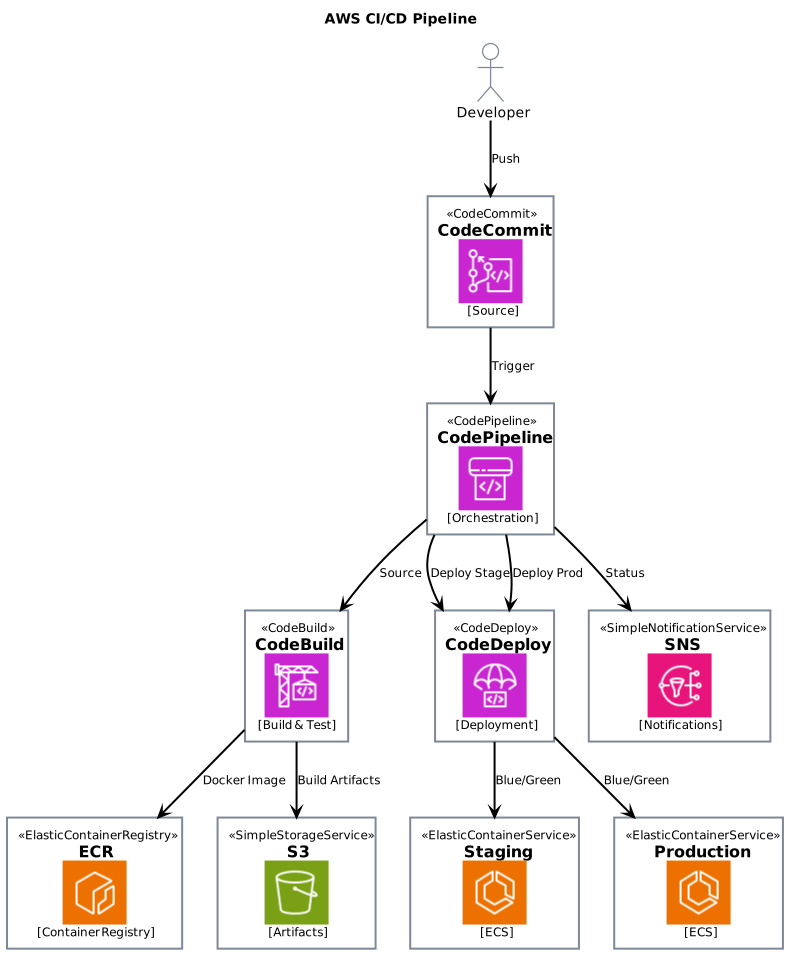
- Format.puml
- Length39 lines
- LibraryAWS icons
The source
39 lines of PlantUML, and pulls in AWS icons. Copy it, or open the template inside Gnomon and render it as it is.
@startuml
!define AWSPuml https://raw.githubusercontent.com/awslabs/aws-icons-for-plantuml/main/dist
!include AWSPuml/AWSCommon.puml
!include AWSPuml/DeveloperTools/CodeCommit.puml
!include AWSPuml/DeveloperTools/CodeBuild.puml
!include AWSPuml/DeveloperTools/CodeDeploy.puml
!include AWSPuml/DeveloperTools/CodePipeline.puml
!include AWSPuml/Containers/ElasticContainerRegistry.puml
!include AWSPuml/Containers/ElasticContainerService.puml
!include AWSPuml/Storage/SimpleStorageService.puml
!include AWSPuml/ApplicationIntegration/SimpleNotificationService.puml

title AWS CI/CD Pipeline

actor Developer as dev

CodeCommit(repo, "CodeCommit", "Source")
CodePipeline(pipeline, "CodePipeline", "Orchestration")
CodeBuild(build, "CodeBuild", "Build & Test")
ElasticContainerRegistry(registry, "ECR", "Container Registry")
SimpleStorageService(artifacts, "S3", "Artifacts")
CodeDeploy(deploy, "CodeDeploy", "Deployment")
ElasticContainerService(staging, "Staging", "ECS")
ElasticContainerService(production, "Production", "ECS")
SimpleNotificationService(notifications, "SNS", "Notifications")

dev --> repo : Push
repo --> pipeline : Trigger
pipeline --> build : Source
build --> registry : Docker Image
build --> artifacts : Build Artifacts
pipeline --> deploy : Deploy Stage
deploy --> staging : Blue/Green
pipeline --> deploy : Deploy Prod
deploy --> production : Blue/Green

pipeline --> notifications : Status

@enduml
Render this offline
This template ships in Gnomon and renders on your machine, with no account and nothing sent to a server. The browser editor is free and needs no install.
Others in AWS architecture diagrams
- Simple ArchitectureThe starting point: a handful of services and the traffic between them.
- VPC ArchitectureSubnets, availability zones and what is actually reachable from where.
- Serverless ArchitectureAPI Gateway, Lambda, DynamoDB: the pattern most greenfield work starts from.
- Microservices ArchitectureService-per-container with the plumbing between them.
- Data Lake ArchitectureIngest, store, catalogue, query.