C4 model diagrams

Context, container, component: the four levels, and when to stop.

C4 is a hierarchy of four zoom levels for describing software architecture: system context, containers, components, and code. Its value is not the notation: which is deliberately plain: but the discipline of picking one level per diagram and staying there. Most unreadable architecture diagrams are two levels mixed together.

When to use these

When not to

Common mistakes

The level-four "code" diagram is almost never worth drawing: it dates the moment someone refactors, and your IDE generates a better one on demand. Simon Brown, who created C4, says the same. Stop at components.

The other common mistake is a container diagram that quietly contains components. If a box on the diagram is not independently deployable or runnable, it is not a container.

The 5 templates

Context Diagram.puml

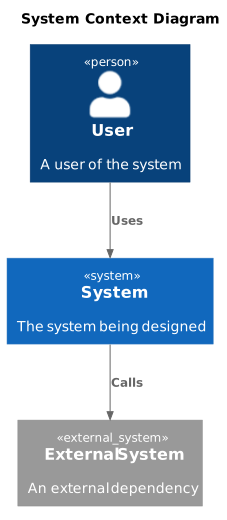
The one to draw first, and often the only one a stakeholder needs.

Context Diagram: rendered example
Show the source
@startuml
!include https://raw.githubusercontent.com/plantuml-stdlib/C4-PlantUML/master/C4_Context.puml

title System Context Diagram

Person(user, "User", "A user of the system")
System(system, "System", "The system being designed")
System_Ext(external, "External System", "An external dependency")

Rel(user, system, "Uses")
Rel(system, external, "Calls")

@enduml

Notes and a copy button for this template

Container Diagram.puml

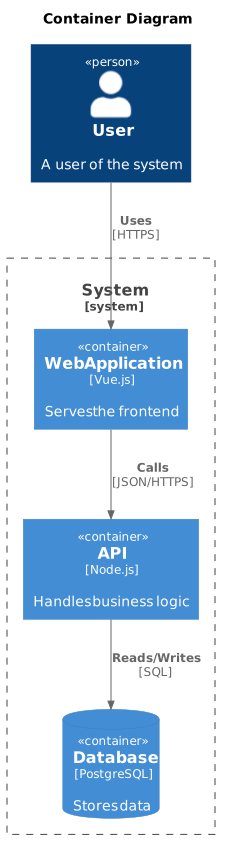
Independently deployable or runnable things: a service, a database, a SPA. Not classes.

Container Diagram: rendered example
Show the source
@startuml
!include https://raw.githubusercontent.com/plantuml-stdlib/C4-PlantUML/master/C4_Container.puml

title Container Diagram

Person(user, "User", "A user of the system")

System_Boundary(boundary, "System") {
  Container(web, "Web Application", "Vue.js", "Serves the frontend")
  Container(api, "API", "Node.js", "Handles business logic")
  ContainerDb(db, "Database", "PostgreSQL", "Stores data")
}

Rel(user, web, "Uses", "HTTPS")
Rel(web, api, "Calls", "JSON/HTTPS")
Rel(api, db, "Reads/Writes", "SQL")

@enduml

Notes and a copy button for this template

Component Diagram.puml

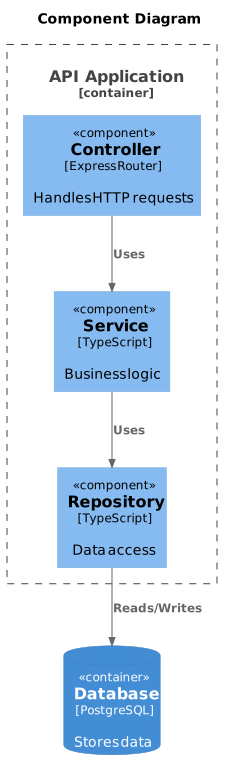
Inside one container. Draw this only when a container is big enough to need it.

Component Diagram: rendered example
Show the source
@startuml
!include https://raw.githubusercontent.com/plantuml-stdlib/C4-PlantUML/master/C4_Component.puml

title Component Diagram

Container_Boundary(api, "API Application") {
  Component(controller, "Controller", "Express Router", "Handles HTTP requests")
  Component(service, "Service", "TypeScript", "Business logic")
  Component(repository, "Repository", "TypeScript", "Data access")
}

ContainerDb(db, "Database", "PostgreSQL", "Stores data")

Rel(controller, service, "Uses")
Rel(service, repository, "Uses")
Rel(repository, db, "Reads/Writes")

@enduml

Notes and a copy button for this template

Dynamic Diagram.puml

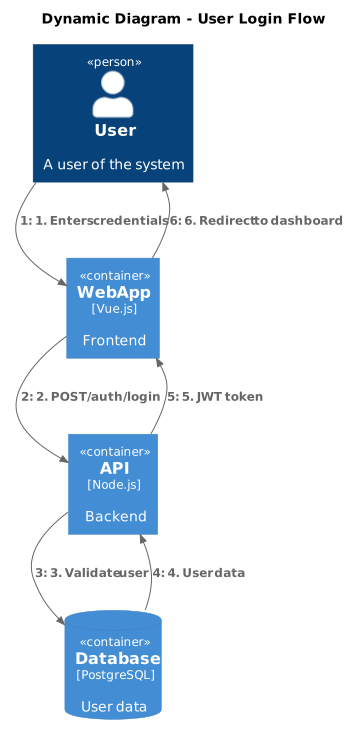
For a specific flow through the static structure: numbered steps, one scenario.

Dynamic Diagram: rendered example
Show the source
@startuml
!include https://raw.githubusercontent.com/plantuml-stdlib/C4-PlantUML/master/C4_Dynamic.puml

title Dynamic Diagram - User Login Flow

Person(user, "User", "A user of the system")
Container(web, "Web App", "Vue.js", "Frontend")
Container(api, "API", "Node.js", "Backend")
ContainerDb(db, "Database", "PostgreSQL", "User data")

Rel(user, web, "1. Enters credentials")
Rel(web, api, "2. POST /auth/login")
Rel(api, db, "3. Validate user")
Rel(db, api, "4. User data")
Rel(api, web, "5. JWT token")
Rel(web, user, "6. Redirect to dashboard")

@enduml

Notes and a copy button for this template

Deployment Diagram.puml

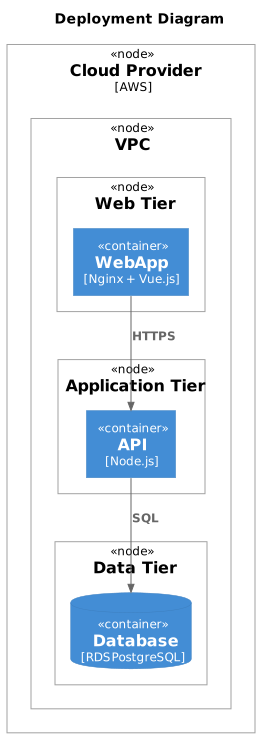
Maps containers onto infrastructure. Where a container diagram cannot answer "where does this run?".

Deployment Diagram: rendered example
Show the source
@startuml
!include https://raw.githubusercontent.com/plantuml-stdlib/C4-PlantUML/master/C4_Deployment.puml

title Deployment Diagram

Deployment_Node(cloud, "Cloud Provider", "AWS") {
  Deployment_Node(vpc, "VPC") {
    Deployment_Node(web_tier, "Web Tier") {
      Container(web, "Web App", "Nginx + Vue.js")
    }
    Deployment_Node(app_tier, "Application Tier") {
      Container(api, "API", "Node.js")
    }
    Deployment_Node(data_tier, "Data Tier") {
      ContainerDb(db, "Database", "RDS PostgreSQL")
    }
  }
}

Rel(web, api, "HTTPS")
Rel(api, db, "SQL")

@enduml

Notes and a copy button for this template

Render these offline

Every template here ships in Gnomon and renders on your machine, with no account and nothing sent to a server. The browser editor is free and needs no install.
Get GnomonOpen the browser editor