Component Diagram
Inside one container. Draw this only when a container is big enough to need it.
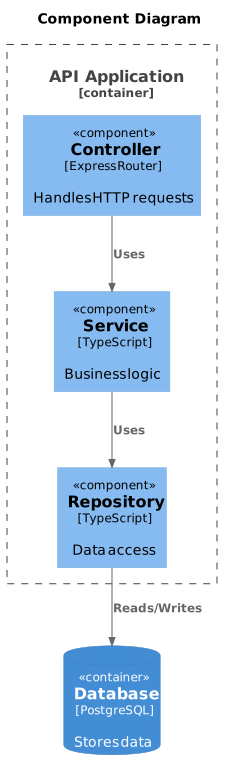
- Format.puml
- Length18 lines
- LibraryC4-PlantUML
The source
18 lines of PlantUML, and pulls in C4-PlantUML. Copy it, or open the template inside Gnomon and render it as it is.
@startuml
!include https://raw.githubusercontent.com/plantuml-stdlib/C4-PlantUML/master/C4_Component.puml

title Component Diagram

Container_Boundary(api, "API Application") {
  Component(controller, "Controller", "Express Router", "Handles HTTP requests")
  Component(service, "Service", "TypeScript", "Business logic")
  Component(repository, "Repository", "TypeScript", "Data access")
}

ContainerDb(db, "Database", "PostgreSQL", "Stores data")

Rel(controller, service, "Uses")
Rel(service, repository, "Uses")
Rel(repository, db, "Reads/Writes")

@enduml
Render this offline
This template ships in Gnomon and renders on your machine, with no account and nothing sent to a server. The browser editor is free and needs no install.
Others in C4 model diagrams
- Context DiagramThe one to draw first, and often the only one a stakeholder needs.
- Container DiagramIndependently deployable or runnable things: a service, a database, a SPA. Not classes.
- Dynamic DiagramFor a specific flow through the static structure: numbered steps, one scenario.
- Deployment DiagramMaps containers onto infrastructure. Where a container diagram cannot answer "where does this run?".