Office and infrastructure diagrams

Servers, firewalls, users and devices, for the diagram everyone still needs.

The Microsoft Office icon set: workstations, servers, firewalls, clouds and people. Unfashionable, and still the fastest way to draw the diagram an auditor, a network engineer or a non-technical stakeholder expects to see.

Not every architecture question is about software. Sometimes the answer is that the thing sits in a rack behind a firewall, and that is worth drawing plainly.

When to use these

When not to

Common mistakes

The trap is nostalgia: reaching for a three-tier infrastructure diagram to describe something that is actually a set of managed services. Draw what is there, not what infrastructure diagrams usually look like.

The 4 templates

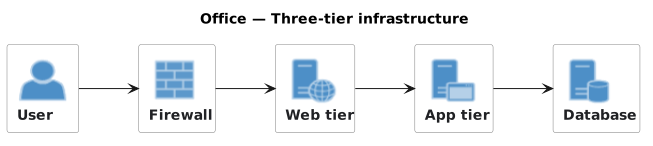
Three-tier Infrastructure.puml

Users, firewall and tiers. The classic, and still the most requested.

Three-tier Infrastructure: rendered example
Show the source
@startuml
!include <office/OfficeCommon>
!include <office/Users/user>
!include <office/Concepts/firewall_orange>
!include <office/Servers/web_server>
!include <office/Servers/application_server>
!include <office/Servers/database_server>

title Office — Three-tier infrastructure

left to right direction

OFF_USER(user, "User")
OFF_FIREWALL_ORANGE(fw, "Firewall")
OFF_WEB_SERVER(web, "Web tier")
OFF_APPLICATION_SERVER(app, "App tier")
OFF_DATABASE_SERVER(db, "Database")

user --> fw
fw --> web
web --> app
app --> db
@enduml

Notes and a copy button for this template

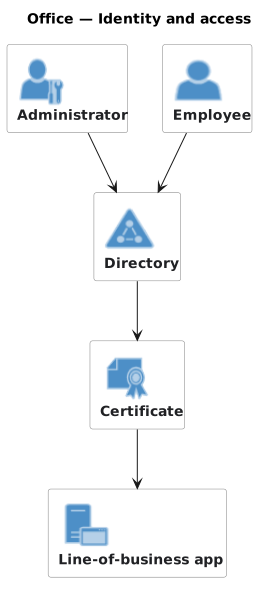
Identity and Access.puml

Administrators and users against what they can reach.

Identity and Access: rendered example
Show the source
@startuml
!include <office/OfficeCommon>
!include <office/Users/administrator>
!include <office/Users/user>
!include <office/Security/active_directory>
!include <office/Security/certificate>
!include <office/Servers/application_server>

title Office — Identity and access

OFF_ADMINISTRATOR(admin, "Administrator")
OFF_USER(user, "Employee")
OFF_ACTIVE_DIRECTORY(ad, "Directory")
OFF_CERTIFICATE(cert, "Certificate")
OFF_APPLICATION_SERVER(app, "Line-of-business app")

admin --> ad
user --> ad
ad --> cert
cert --> app
@enduml

Notes and a copy button for this template

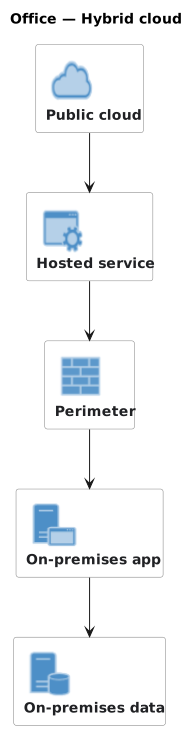
Hybrid Cloud.puml

On-premises beside cloud, with the link between them named.

Hybrid Cloud: rendered example
Show the source
@startuml
!include <office/OfficeCommon>
!include <office/Clouds/cloud>
!include <office/Servers/application_server>
!include <office/Servers/database_server>
!include <office/Concepts/firewall_orange>
!include <office/Concepts/service_application>

title Office — Hybrid cloud

OFF_CLOUD(cloud, "Public cloud")
OFF_SERVICE_APPLICATION(svc, "Hosted service")
OFF_FIREWALL_ORANGE(fw, "Perimeter")
OFF_APPLICATION_SERVER(app, "On-premises app")
OFF_DATABASE_SERVER(db, "On-premises data")

cloud --> svc
svc --> fw
fw --> app
app --> db
@enduml

Notes and a copy button for this template

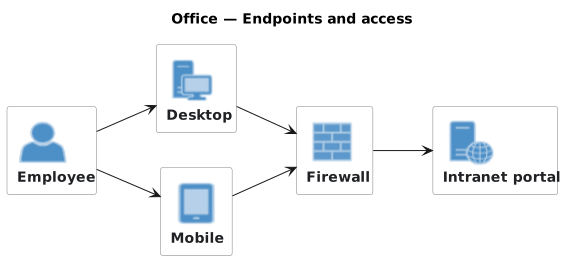
Endpoints and Access.puml

Workstations, phones and how they get in. The device side of access.

Endpoints and Access: rendered example
Show the source
@startuml
!include <office/OfficeCommon>
!include <office/Devices/workstation>
!include <office/Devices/cell_phone_generic>
!include <office/Concepts/firewall_orange>
!include <office/Servers/web_server>
!include <office/Users/user>

title Office — Endpoints and access

left to right direction

OFF_USER(user, "Employee")
OFF_WORKSTATION(pc, "Desktop")
OFF_CELL_PHONE_GENERIC(phone, "Mobile")
OFF_FIREWALL_ORANGE(fw, "Firewall")
OFF_WEB_SERVER(portal, "Intranet portal")

user --> pc
user --> phone
pc --> fw
phone --> fw
fw --> portal
@enduml

Notes and a copy button for this template

Render these offline

Every template here ships in Gnomon and renders on your machine, with no account and nothing sent to a server. The browser editor is free and needs no install.
Get GnomonOpen the browser editor