Sequence, class, state, ERD, activity: the workhorses.
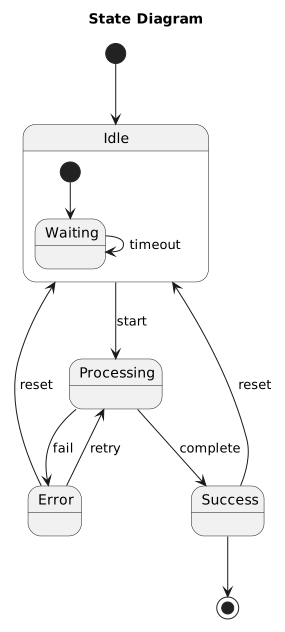
The diagram types most engineers already half-know. Sequence and state diagrams are the two that repay the effort most often, because both describe things prose is genuinely bad at: interleaving over time, and the set of legal transitions.
When to use these
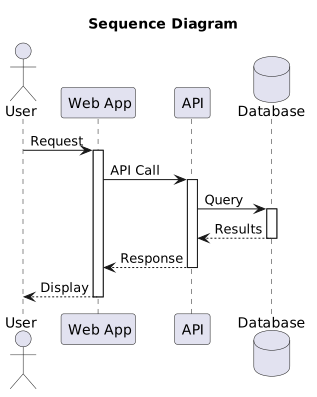
Sequence: any interaction with more than two participants, or any retry, timeout or async hop.
State: anything with a lifecycle, especially where an invalid transition is a real bug class.
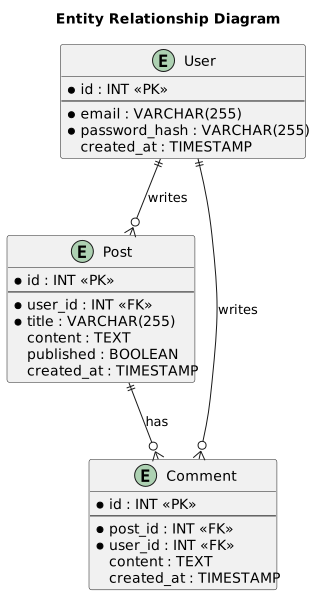
ERD: before writing a migration, not after.
When not to
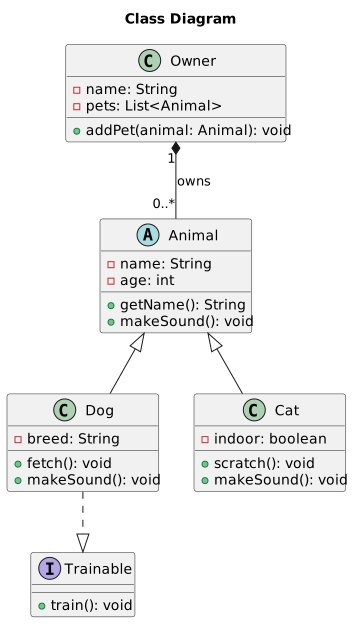
Class diagrams of an entire codebase. They go stale immediately and nobody reads them.
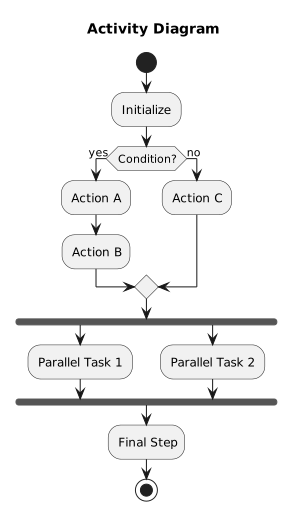
Activity diagrams where a numbered list would do. If it has no branches, it is a list.
Common mistakes
Sequence diagrams grow horizontally without limit and become unreadable somewhere around eight participants. If yours has more, it is usually two diagrams: the happy path, and the failure handling.
State diagrams are worth drawing precisely because they force you to answer "what happens if this arrives twice?", a question that rarely gets asked in prose.
The highest-value diagram in this list. Time runs down; participants across.
Show the source
@startuml

title Sequence Diagram

actor User as U
participant "Web App" as W
participant "API" as A
database "Database" as D

U -> W: Request
activate W

W -> A: API Call
activate A

A -> D: Query
activate D
D --> A: Results
deactivate D

A --> W: Response
deactivate A

W --> U: Display
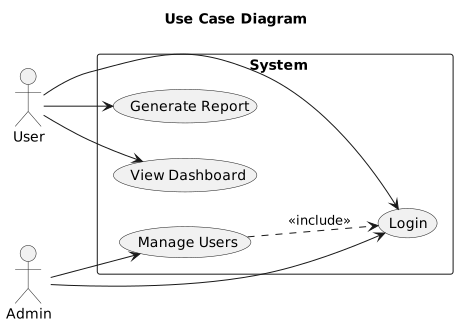
Actor-to-goal. Dated, but still the clearest way to show scope boundaries.
Show the source
@startuml

title Use Case Diagram

left to right direction

actor "User" as user
actor "Admin" as admin

rectangle "System" {
  usecase "Login" as UC1
  usecase "View Dashboard" as UC2
  usecase "Manage Users" as UC3
  usecase "Generate Report" as UC4
}

user --> UC1
user --> UC2
user --> UC4

admin --> UC1
admin --> UC3
UC3 ..> UC1 : <<include>>
Cardinality is the part people get wrong. Write it explicitly.
Show the source
@startuml

title Entity Relationship Diagram

entity "User" as user {
  * id : INT <<PK>>
  --
  * email : VARCHAR(255)
  * password_hash : VARCHAR(255)
  created_at : TIMESTAMP
}

entity "Post" as post {
  * id : INT <<PK>>
  --
  * user_id : INT <<FK>>
  * title : VARCHAR(255)
  content : TEXT
  published : BOOLEAN
  created_at : TIMESTAMP
}

entity "Comment" as comment {
  * id : INT <<PK>>
Plans, not architecture, but it renders from text, so it diffs in review.
Show the source
@startgantt

title Project Timeline

Project starts 2024-01-01

[Planning] lasts 10 days
[Design] lasts 15 days
[Design] starts at [Planning]'s end

[Development] lasts 30 days
[Development] starts at [Design]'s end

[Testing] lasts 15 days
[Testing] starts at [Development]'s end

[Deployment] lasts 5 days
[Deployment] starts at [Testing]'s end

@endgantt
Every template here ships in Gnomon and renders on your machine, with no account and nothing sent to a server. The browser editor is free and needs no install.