Threat model diagrams

STRIDE, generated from architecture you already drew.

Threat modelling stalls because it is treated as a separate artefact requiring a separate workshop. It is far cheaper when it reads the architecture diagram you already have: trust boundaries and data flows are exactly the inputs STRIDE needs.

When to use these

When not to

Common mistakes

A threat model with no trust boundaries produces nothing useful. The boundary is what makes a flow interesting. If every element is inside one boundary, the model has not been drawn yet.

Treat the generated register as a starting point that you argue with, not an answer. The value is in the threats you reject with a reason.

The 2 templates

Threat Model — Web App.puml

Browser, API, database: the shape most systems actually are.
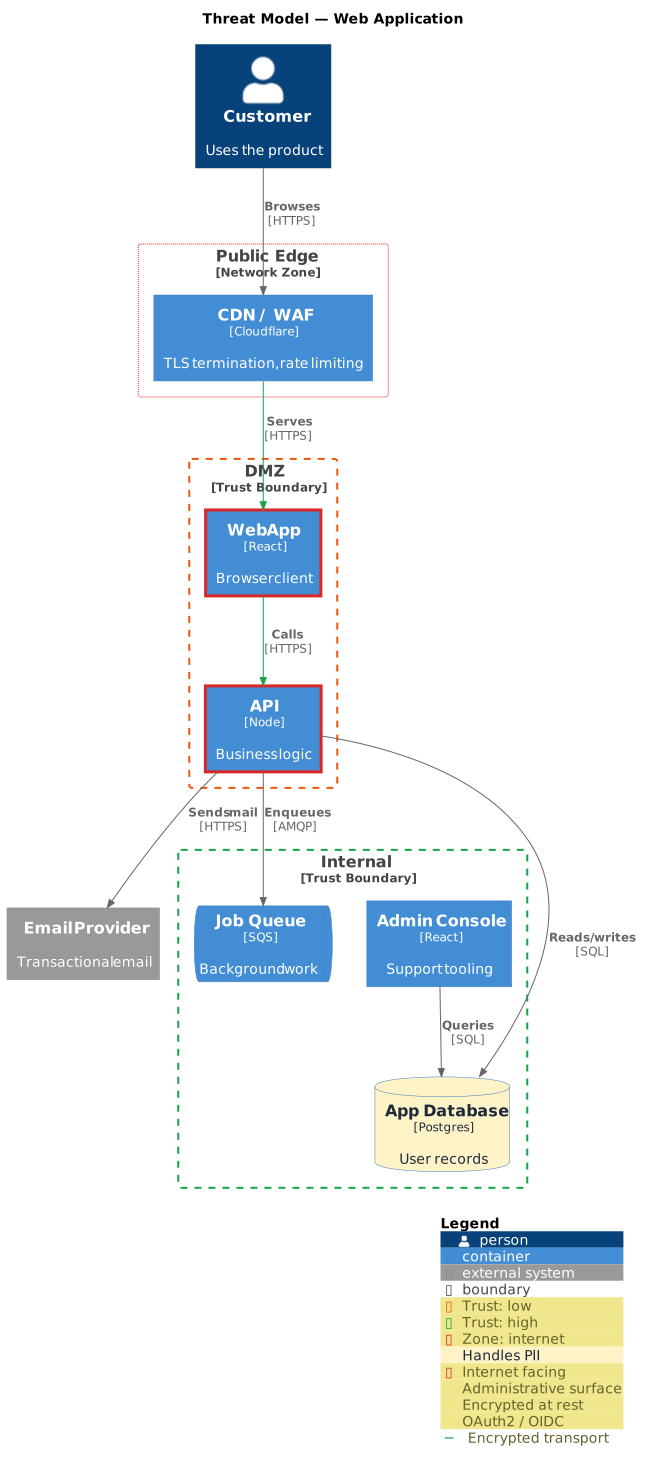
Threat Model — Web App: rendered example
Show the source
@startuml
!include https://raw.githubusercontent.com/plantuml-stdlib/C4-PlantUML/master/C4_Container.puml
!include <threat/ThreatModel>

title Threat Model — Web Application

Person(user, "Customer", "Uses the product")

NetworkBoundary(edge, "Public Edge", "internet") {
  Container(waf, "CDN / WAF", "Cloudflare", "TLS termination, rate limiting")
}

TrustBoundary(dmz, "DMZ", "low") {
  Container(web, "Web App", "React", "Browser client", $tags="internet_facing")
  Container(api, "API", "Node", "Business logic", $tags="internet_facing+authn_oauth2")
}

TrustBoundary(core, "Internal", "high") {
  ContainerDb(db, "App Database", "Postgres", "User records", "", "pii+encrypted_at_rest+audit_logged")
  ContainerQueue(jobs, "Job Queue", "SQS", "Background work")
  Container(admin, "Admin Console", "React", "Support tooling", $tags="admin+mfa+authn_oauth2")
}

System_Ext(mail, "Email Provider", "Transactional email")
The rest of this template, and how to use it

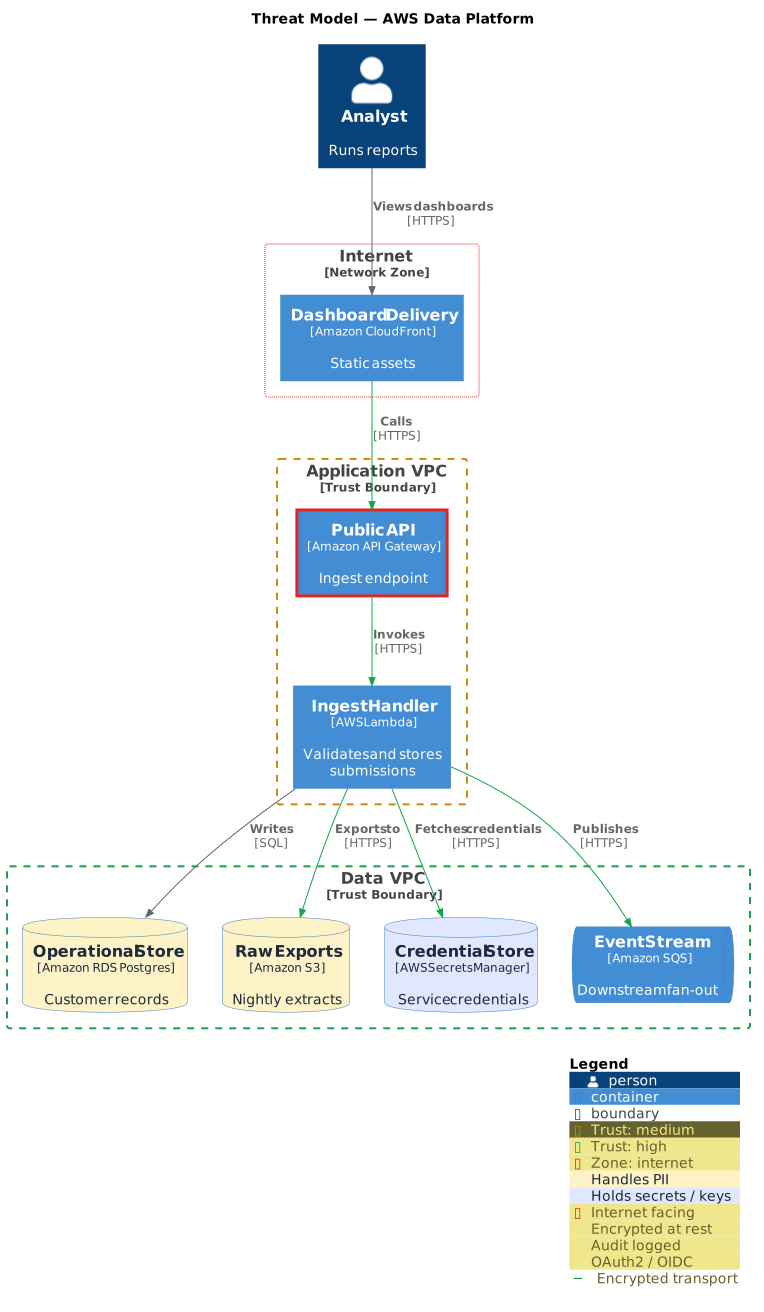
Threat Model — AWS.puml

Cloud-hosted, with the boundaries a VPC and IAM imply.

Threat Model — AWS: rendered example
Show the source
@startuml
!include https://raw.githubusercontent.com/plantuml-stdlib/C4-PlantUML/master/C4_Container.puml
!include <threat/ThreatModel>

title Threat Model — AWS Data Platform

Person(analyst, "Analyst", "Runs reports")

NetworkBoundary(edge, "Internet", "internet") {
  Container(cdn, "Dashboard Delivery", "Amazon CloudFront", "Static assets")
}

TrustBoundary(app, "Application VPC", "medium") {
  Container(gateway, "Public API", "Amazon API Gateway", "Ingest endpoint", $tags="internet_facing+authn_oauth2")
  Container(ingest, "Ingest Handler", "AWS Lambda", "Validates and stores submissions")
}

TrustBoundary(data, "Data VPC", "high") {
  ContainerDb(store, "Operational Store", "Amazon RDS Postgres", "Customer records", "", "pii+encrypted_at_rest+audit_logged")
  ContainerDb(exports, "Raw Exports", "Amazon S3", "Nightly extracts", "", "pii")
  ContainerDb(vault, "Credential Store", "AWS Secrets Manager", "Service credentials", "", "secret+audit_logged")
  ContainerQueue(events, "Event Stream", "Amazon SQS", "Downstream fan-out")
}

The rest of this template, and how to use it

Render these offline

Every template here ships in Gnomon and renders on your machine, with no account and nothing sent to a server. The browser editor is free and needs no install.

Get GnomonOpen the browser editor